Keep your classrooms running smoothly.
Elevate learning with precision through educational asset tracking.

Education Asset Tracking Software
The Smart Move is to add efficient education asset tracking.
Schools, colleges, and universities from K-12 districts to higher education campuses, manage a wide range of assets—from classroom furniture, lab equipment, and technology devices to cafeteria supplies, fitness gear, and administrative resources. Many institutions still rely on spreadsheets, which can lead to lost items, inaccuracies, and wasted staff time. Efficient education asset tracking allows teams to monitor and manage these resources across multiple locations, maintain assets in good condition, reduce losses, and ensure that the right equipment and materials are always available when and where they’re needed.
Track assets anytime- anywhere.
Whether you’re managing classrooms, campus facilities, or district-wide operations, Panatrack keeps your school’s asset data connected and up to date.
Simplify audits and reporting.
Schools and academic institutions have a high number of assets to manage including operational, custodial, classroom, and technology. Add a solution that provides visibility and reporting to all your assets.
Ensure all the assets are maintained.
Don’t let broken assets cause delays in the classroom or your operations. Maintain lab, custodial, fitness, technology, and operational assets in good working order.
In this brief 3-minute video, we will show you how Panatrack tracks your inventory and assets across locations, departments, and teams, whether you’re in the office, overseeing facilities, or working from another location.
Simple, powerful, and designed for how your team works.
See how easy fixed asset tracking can be.
What you get with Panatrack
Panatrack is a cloud-based asset tracking solution that keeps your data interconnected and your assets always visible. Accessible from any location on desktop or mobile, it ensures your team stays in control whether in the office, across facilities, or on the go.

Built for Every Team and Workflow
Easily track and share assets across teachers, administrators, and facilities staff. Check laptops, cameras, or lab kits in and out, assign equipment to classrooms, and move items between schools with full accountability.
Full Visibility from Desktop or Mobile
See where every resource is located, whether in a classroom, storage room, or checked out to a student or faculty member. Supports unlimited users and mobile barcode scanning for easy updates across the district.
Seamless System Integration
Panatrack works alongside your existing student information, ERP, or financial systems to align assets with budgets and reporting. Track warranties, retirement dates, and disposal details to plan replacements responsibly.

Stronger Accountability Across Staff and Students
Assign custody and ownership so you always know who is responsible for devices, lab gear, or classroom resources.
Streamline Audits and Notifications
Speed up year-end inventory, federal and state reporting, and grant compliance with accurate, centralized records. Use categories and rules to manage IT devices, furniture, and consumables in one place.
Reduce Loss and Keep Learning on Track
Ensure equipment is available where it is needed, whether laptops for testing week, lab kits for class, or AV gear for assemblies. This reduces downtime and avoids last-minute scrambles or unnecessary replacements.
Industries Benefiting from Educational Asset Management
Schools, colleges, and libraries rely on a wide range of assets to support learning and day-to-day operations. From classroom technology and lab equipment to furniture and facility resources, keeping everything accounted for is essential. Panatrack provides real-time visibility to ensure assets are available when needed, reduce loss, and simplify audits.
K-12 School Districts
Technical Schools
Universities
Libraries
How Panatrack works for tracking educational assets
Item Categories
Define how different types of items are tracked with categories. Define rules and data to capture for each type of item. Identify assets versus inventory type items.
Unlimited Attributes
Customizable fields are available for configuration and assignment to items and transactions. Add flexibility to identify when the field is accessible, required, optional, or displayed.
Advanced Grid Views
Access information and details from customizable grid views with filtering capabilities. Quickly change the sort order to find what you need.
Forms and Checklists
Set up checklists and forms for maintenance and place-in-service activities. Define information to capture based on transactions.
Signature Capture
Capture signatures on transactions to add accountability.
Custody and Ownership
Track beyond location with custody and ownership assignments. Create accountability to better manage your inventory and assets.
Track Location
Know the location of assets when managing them. Define staging areas and storage areas to keep your assets organized.
Check Out
Check out fixed assets and consumables. Capture a check-out period or expected return date. Signature capture adds accountability.
Check In
Easily record check ins with the option to assign a status and condition. Get notified of upcoming and past due maintenance.
Place In Service
Improve the management of assets that require configuration and setup prior to being available to check out or deploy. Add checklists and capture additional information to make sure proper setup has been completed.
Deploy Assets
For stationary assets or assets located at an external location, easily manage location and status.
Maintenance Tracking
Set up maintenance schedules to keep all assets in operating condition. Record unscheduled maintenance activities, define work orders and record parts used.
Audits and Validations
Complete periodic audits to validate location and custody of your assets and inventory. Monitor last validations dates to help determine lost assets. Easily transfer and move assets found out of place.
Parent-Child Relationships
Assign parent-child relationships using the Unit Build features or movable containers. Create kits or manage equipment builds.
Receiving and Adds
Easily add new assets to the system. Track items by unique asset tag, serial number, or by a quantity. Utilize purchase orders and PO Receiving.
Grouping for Financial Reporting
Group assets for association to a financial asset record for reporting and audits.
Retire and Disposal
Track retirement dates and capture additional details when assets are disposed.
iOS and Android Apps
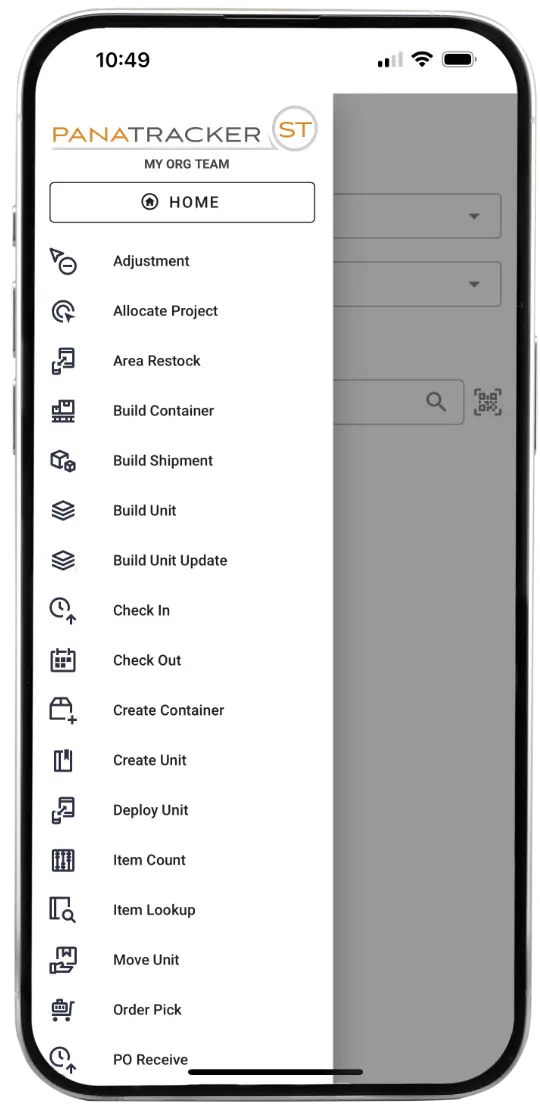
The mobile app is available on both iOS and Android. Use your phone, tablet, or a dedicated device with barcode scanning.
Scan First
Look up information with ease using Scan First. Find available quantities, location, custodian, and unit details. Look up what items are in an area location.
Barcode Scanning Support
Utilize your phone's camera or use the device barcode scanner to quickly record transactions.
Single Login for Mobile and Desktop
Log into the mobile app and to the browser interface using the same login credentials.
Role-Based Access
Assign users roles to tailor what transactions they can complete for each team they are a member of.
GPS Capture
Capture the GPS coordinates based on each transaction completed using the mobile app.
SOC 2 Certified
Panatrack holds SOC 2 Type II certification, providing an additional level of security and assurance
User Roles and Permissions
Assign organization roles for administrative features to each user. Define team roles based on each user's job responsibilities.
Transaction Logging
All transaction activity is logged to provide visibility of who completed the transactions and when.
Flexible Attributes
Utilization of attributes support compliance tracking such as warranty end dates, disposal reasons, and inspection details.
Ready to organize assets across every team and location?
Chain of Custody: Full Accountability at Every Step
Panatrack captures every movement — who, what, when, where, and how — so your crews stay accountable, and your inventory stays audit-ready.

- Track every asset by tag, serial, or ID.
- Log each handoff with user accountability.
- Capture timestamps for every transaction.
- Record locations across teams, sites, and projects.
- Define transaction types like check-out, transfer, return, or disposal.
- Generate full history for audits, compliance, and loss prevention.
With every handoff tracked and every crew accountable, Panatrack doesn’t just show where your assets are — it shows where they’ve been and where they’re headed next.
A Full Lifecycle Approach to Educational Asset Tracking
Panatrack follows your institution’s assets through every stage, making it easy to manage resources from acquisition to retirement. By tracking the lifecycle of each item, schools, colleges, universities, and libraries can reduce loss, extend asset lifespan, and ensure resources are available when and where they are needed.
Tag and Add Assets
Add barcode tags to high-value items such as laptops, lab equipment, AV devices, or specialized training tools as they arrive. Track low-value, high-volume items like textbooks, calculators, or consumables by item number and quantity.
Validate and Count
Complete counts across classrooms, labs, libraries, and shared campus spaces. Update locations, verify custodians, and generate audit-ready reports to support budgeting and planning.
Transfer and Reassign
Move resources between classrooms, labs, departments, or buildings. Make sure shared equipment is tracked so staff, faculty, and students always know what is available.
Check Out Assets
Record check-outs for students, staff, faculty, or researchers. Track who has each item and when it is due back to increase accountability and reduce losses.
Maintain and Service
Schedule regular maintenance for lab equipment, AV devices, fitness equipment, or operational resources. Keep items in good working order to prevent delays in classrooms, labs, or library spaces.
Manage Asset Disposal
Track when assets such as desks, computers, lab kits, or reference materials are retired or disposed. Monitor replacements to plan budgets efficiently and ensure continuity of resources across your institution.
Ready for answers built around your school or campus?
Let us show you how this solution fits the way your team manages educational assets.
Frequently Asked Questions
How does this help with tracking our assets across staff, students, and locations?
Panatrack ST ensures seamless tracking of your assets, including equipment, technology devices, furniture, and more, as they transition between individuals, departments, campuses, or other locations. Updates are easy to complete using barcode scanning from the mobile app to keep everything up to date.
We’ve been using spreadsheets. Why change to Panatrack ST?
Spreadsheets don’t provide access and visibility to everyone that needs it. Information is frequently out-of-date due to delays in making updates. Updates in spreadsheets are prone to errors and omissions.
Panatrack ST offers real-time, validated updates through transactions giving you an audit trail. Transactions are easy to complete by your team using the mobile app or from the desktop app. Barcode scanning makes it easy and adds accuracy.
Does Panatrack support K-12 school districts as well as colleges and universities?
Yes. Panatrack’s education asset tracking software is built to scale from a single K-12 school district to multi-campus colleges and universities. Whether you’re managing classroom technology, lab equipment, or facility resources, Panatrack adapts to how your institution tracks and reports on assets, without forcing you into a rigid, one-size-fits-all template.
How is this different from the software systems we already use?
How quickly can teams start using this?
Our team is available for onboarding and training. We work with you at every step. Every organization is different based on the status of your assets and what data is available for importing. Once everything is set up, you will find the system easy to use.
Can this track assets across multiple teams, departments, and locations?
Yes, Panatrack effectively manages assets across various sectors including offices, educational institutions, libraries, IT departments and more. This enables comprehensive tracking of all assets within a single centralized system.
Can this track supplies and materials too?


Ready to see us in action?
Let’s walk through our education asset tracking solution.